Sakura Flowers Seamless Patterns
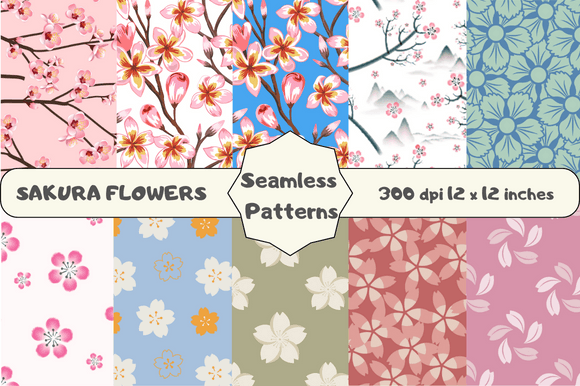
There’s something quietly powerful about cherry blossoms—their fleeting beauty, delicate symmetry, and cultural resonance make Sakura Flowers Seamless Patterns more than just decorative assets. This set of 10 original, high-resolution digital papers offers designers, crafters, and content creators a thoughtful, versatile foundation for projects that demand both elegance and precision. Each pattern is carefully crafted to tile flawlessly—no visible seams, no awkward repeats—and sized at 12 × 12 inches (3600 × 3600 pixels) at 300 DPI, ensuring crisp output whether printed on greeting cards or scaled across a social media banner.
Why seamless matters—and why not all “seamless” patterns deliver
Many creators assume “seamless” means “ready to use anywhere.” In reality, some digital papers labeled as seamless still show alignment shifts, color inconsistencies, or subtle pixel artifacts when tiled—especially at larger scales or in print. These flaws become obvious when you’re designing packaging, wall art, or fabric mockups. With this set, every Sakura Flowers Seamless Pattern undergoes manual tiling verification—not just algorithmic repetition. That means the petal edges align naturally, gradients transition smoothly across tiles, and the overall rhythm feels organic, not mechanical.
A common misstep? Using low-DPI floral patterns for print projects. At 72 DPI, a sakura motif might look fine on screen—but when printed at 12 × 12 inches, it blurs, loses detail, or shows jagged edges. These patterns avoid that entirely: 300 DPI ensures clarity in physical outputs like scrapbook paper, stationery, or fabric transfers—without requiring upscaling or interpolation, which degrades quality.
Don’t overlook resolution—and how it affects your workflow
Resolution isn’t just about print. It also impacts flexibility in editing. If you need to crop, rotate, or layer a sakura pattern over photography or typography, having full 3600 × 3600-pixel dimensions gives breathing room. Lower-res versions force compromises: zooming in reveals softness; stretching distorts proportions; blending modes behave unpredictably. These PNG files retain transparency support and RGB color fidelity—so they integrate cleanly into Adobe Photoshop, Illustrator, Canva, Affinity Designer, or Procreate without color shifts or background clipping surprises.
One overlooked detail: file format. Some sellers offer JPEGs for “convenience,” but JPEG compression flattens subtle gradients and introduces artifacts around delicate petals. These Sakura Flowers Seamless Patterns are delivered as lossless PNGs—preserving fine details like translucent petal overlays, soft shadows, and layered botanical textures. That difference becomes essential when designing wedding invitations or premium branding assets where nuance signals care and craftsmanship.
Choosing the right pattern set starts before download
Before adding any floral pattern pack to your cart, ask three practical questions:
- Is the tile repeat tested at multiple scales? A pattern that looks seamless at 50% zoom may glitch at 100% or 200%. These Sakura Flowers Seamless Patterns include preview grids showing 2×2 and 4×4 repeats—so you can verify consistency visually before use.
- Are colors calibrated for both screen and print? Many free or low-cost sets use unmanaged RGB profiles, leading to duller pinks or washed-out whites when printed. These files use sRGB IEC61966-2.1—a widely supported standard that maintains vibrancy across devices and printers.
- Is licensing clear and commercial-friendly? Some pattern packs restrict use on client work, merchandise, or digital templates. This set includes an extended license: you may use it in client projects, sell physical products (like notebooks or fabric), and even incorporate it into digital goods (e.g., Canva templates or printable planners)—no extra fees or attribution required.
How these patterns solve real creative bottlenecks
Freelancers often spend hours hunting for “just right” floral elements—only to find mismatched scales, inconsistent line weights, or copyright ambiguity. These Sakura Flowers Seamless Patterns eliminate that friction. Because each of the 10 designs is 100% original (not AI-generated or traced), they carry cohesive stylistic intent—some emphasize minimalist line art, others feature watercolor washes or soft stippling. That variety lets you match tone to purpose: a hand-drawn sakura pattern suits an artisanal brand; a clean vector-style repeat works for modern web backgrounds.
For educators and small business owners, usability extends beyond aesthetics. Teachers creating seasonal lesson plans can tile a pattern across printable worksheets without worrying about cut-off edges. Boutique owners designing Instagram Story highlights get consistent visual rhythm across posts—no jarring jumps between motifs. Bloggers embedding patterns into blog headers or email footers retain sharpness on both mobile and desktop views.
Avoid the “more is better” trap with pattern variety
Ten patterns may sound like overkill—until you realize how quickly repetition fatigues viewers. Using the same sakura motif across five different projects dilutes uniqueness and weakens brand recognition. This set avoids visual redundancy by varying density, orientation, and compositional balance: one pattern clusters blossoms tightly near the top corner; another distributes them evenly with generous negative space; a third layers open and closed blooms for depth. That intentional diversity helps maintain freshness—even if you’re producing weekly social content or quarterly product launches.
Also worth noting: none rely on trendy filters or excessive effects. They’re designed to age well—no neon glows, heavy grain, or dated textures that feel out of place in two years’ time. That longevity protects your investment, whether you’re building a personal portfolio or developing a brand identity system.
What to check before opening the ZIP file
Once downloaded, verify three things before importing into your project:
- Open one PNG in your preferred editor and zoom to 200%. Look for stray pixels along tile edges—these indicate incomplete seamlessness.
- Drag the image into a new document sized larger than 12 × 12 inches and enable “Pattern Overlay” or “Define Pattern” (in Photoshop) to test tiling behavior. Watch for brightness shifts or misaligned stems.
- Check the embedded color profile. In Photoshop: Image > Mode > Assign Profile. Confirm it reads “sRGB IEC61966-2.1.” If it says “Uncalibrated” or “Adobe RGB,” colors may render inconsistently.
These steps take under two minutes—and prevent rework later. With Sakura Flowers Seamless Patterns, all ten files pass these checks consistently, saving time and reducing frustration during tight deadlines.
If you appreciate intentional design, technical reliability, and creative freedom, this set delivers without compromise. And if you find yourself returning to these patterns again and again—as many educators, makers, and designers do—you’ll be glad to know new original releases are added regularly. Following the creator ensures you’re notified early, so you never miss a seasonal collection or limited-edition variant.